External Authorization for Your Web Apps

Eliminate custom login code by offloading authentication to a reverse proxy that passes trusted identity headers directly to your Go or PHP apps.

You’ve got a Go API. Or a PHP app. Or both. And you need to protect them. The instinct is to reach for a library, bolt on JWT handling, wire up a database for sessions, and build yet another login form. But there’s a better way — one that separates authentication from your application entirely.

External authorization systems sit in front of your app, handle the messy parts (login flows, MFA, session management), and pass you clean, trusted headers with user information. Your app just reads them. That’s it.

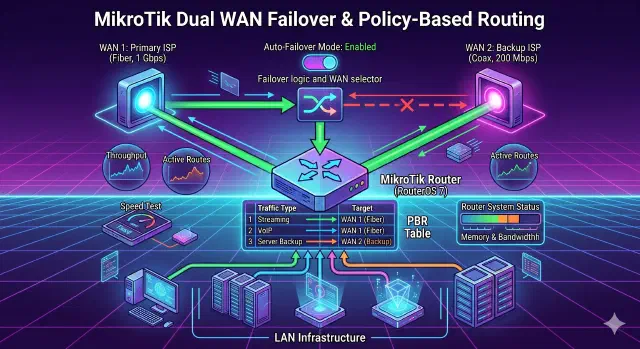
MikroTik Dual WAN Failover & Policy-Based Routing

Configure dual-WAN failover and policy-based routing on MikroTik RouterOS v7 so your backup link takes over automatically and selected destinations always use a specific WAN.

MikroTik RouterOS v7: Dual WAN Failover & Policy-Based Routing

If you have a MikroTik router and two internet connections (a primary high-speed line and a secondary backup line), you probably have two goals:

  1. Automatic Failover: If the Main Connection drops, the router should switch to the Backup Connection automatically.
  2. Policy Routing: You may want to force specific destinations (like a work server, a gaming server, or a specific streaming service) to always use the for example Backup Connection, regardless of the main connection status.

This guide covers how to set this up using RouterOS v7 via the Command Line (CLI).

How to Get Real Client IPs in Fiber When Using a Reverse Proxy

Build robust and modern HTTP servers in Go with practical code examples and best practices.

Getting Real Client IPs in Fiber Behind a Proxy

When your Fiber application runs behind a reverse proxy like Caddy, Nginx, or Cloudflare, you’ll notice that c.IP() returns the proxy’s IP address instead of your actual visitor’s IP. This happens because Fiber sees the direct connection, which is from the proxy server, not the original client.

Why This Happens

By default, Fiber reads the IP from the direct TCP connection for security reasons. Without proper configuration, it doesn’t know there’s a trusted proxy in front of it passing along the real client information in HTTP headers.

Level Up Your Go Web Server: Mastering Advanced Routing with net/http

Build robust and modern HTTP servers in Go with practical code examples and best practices.

Level Up Your Go Web Server: Mastering Advanced Routing with net/http

Building robust and maintainable web applications in Go often hinges on how effectively you manage incoming HTTP requests. While Go’s built-in net/http package provides foundational tools, its advanced routing features empower you to create sophisticated and organized application logic. This article will guide you through practical code examples for path parameters, HTTP method constraints, host-based routing, middleware, sub-routing, and context-elevating your Go web server development.

Setting Up Cloudflare Tunnel: A Modern Alternative to Ngrok

Setting Up Cloudflare Tunnel: A Modern Alternative to Ngrok

Learn how to securely expose your local services using Cloudflare Tunnel

Quick and Free Way to Share Your Local Docker Service with Clients

Ever been in that situation where you’ve built something cool in Docker and want to quickly show it to your client? Yeah, me too. Recently, I was wrapping up a database admin panel project and needed a way to let my client review it before the final deployment.

My go-to solution used to be Ngrok. It works, but the free tier gives you random URLs that look like 8f4d-192-158-1-38.ngrok.io. Not very professional when sending to clients, right? Plus, these URLs change every time you restart the tunnel.