DevOps

Centralized Authentication with lldap: A Practical Guide

Centralized Authentication with lldap: A Practical Guide

What problem does this solve?

If you’re running a homelab or a small infrastructure with multiple self-hosted services, you’ve probably hit this wall: every service has its own user database. Nextcloud has one, Gitea has another, Portainer has its own, and so on. Add a new team member? You’re creating accounts in five different places. Someone leaves? Good luck remembering where they had access.

LDAP solves this by giving you a single directory where all your users and groups live. Each service connects to this directory instead of maintaining its own user list. You create a user once, assign them to groups, and every connected service knows who they are and what they can access.

External Authorization for Your Web Apps

External Authorization for Your Web Apps

Eliminate custom login code by offloading authentication to a reverse proxy that passes trusted identity headers directly to your Go or PHP apps.

You’ve got a Go API. Or a PHP app. Or both. And you need to protect them. The instinct is to reach for a library, bolt on JWT handling, wire up a database for sessions, and build yet another login form. But there’s a better way — one that separates authentication from your application entirely.

External authorization systems sit in front of your app, handle the messy parts (login flows, MFA, session management), and pass you clean, trusted headers with user information. Your app just reads them. That’s it.

MikroTik Dual WAN Failover & Policy-Based Routing

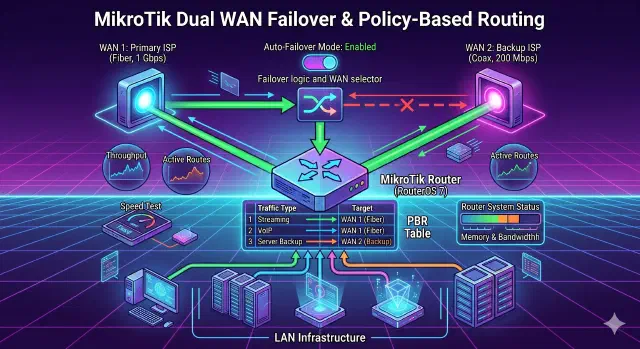
Configure dual-WAN failover and policy-based routing on MikroTik RouterOS v7 so your backup link takes over automatically and selected destinations always use a specific WAN.

MikroTik RouterOS v7: Dual WAN Failover & Policy-Based Routing

If you have a MikroTik router and two internet connections (a primary high-speed line and a secondary backup line), you probably have two goals:

  1. Automatic Failover: If the Main Connection drops, the router should switch to the Backup Connection automatically.
  2. Policy Routing: You may want to force specific destinations (like a work server, a gaming server, or a specific streaming service) to always use the for example Backup Connection, regardless of the main connection status.

This guide covers how to set this up using RouterOS v7 via the Command Line (CLI).

Cloudflare Tunnel: A Modern Alternative to Ngrok

Cloudflare Tunnel: A Modern Alternative to Ngrok

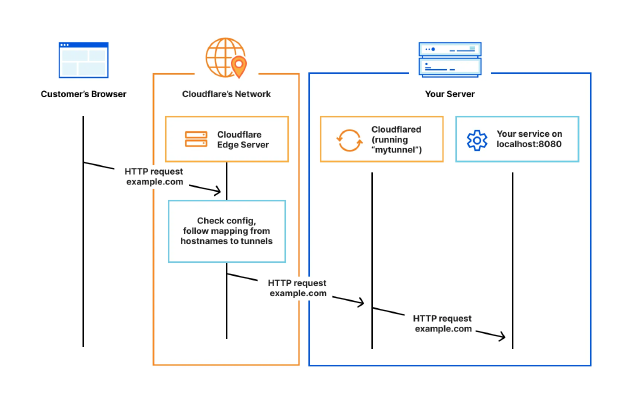
Learn how to securely expose your local services using Cloudflare Tunnel

Quick and Free Way to Share Your Local Docker Service with Clients

Ever been in that situation where you’ve built something cool in Docker and want to quickly show it to your client? Yeah, me too. Recently, I was wrapping up a database admin panel project and needed a way to let my client review it before the final deployment.

My go-to solution used to be Ngrok. It works, but the free tier gives you random URLs that look like 8f4d-192-158-1-38.ngrok.io. Not very professional when sending to clients, right? Plus, these URLs change every time you restart the tunnel.

How to Configure S3 Access for AWS App Runner A Complete IAM and VPC Setup Guide

Introduction

When deploying applications on AWS App Runner, you may need to access S3 buckets to store or retrieve data. However, by default, App Runner services don’t have permission to interact with S3. This guide aims to solve that problem by walking you through the process of granting your App Runner service secure access to S3 buckets.

We’ll achieve this by:

  1. Creating an IAM role with the necessary S3 permissions
  2. Configuring your App Runner service to use this role
  3. Setting up networking components (if using a VPC) to ensure connectivity

By following these steps, you’ll enable your App Runner service to securely read from and write to S3 buckets, allowing for seamless integration of S3 storage in your application.